Sandboxing MCP Servers in a Regulated Multi-Tenant SaaS: Two Tiers That Actually Hold Up
Sandboxing MCP Servers in a Regulated Multi-Tenant SaaS: Two Tiers That Actually Hold Up
MCP server sandboxing is not a single setting. It is a chain of boundaries, and the question “which sandbox should I use” has a different answer depending on whose data the server handles.
If you are still setting up the agent itself, start with our private AI agent setup guide. Before adding MCP servers to the agent’s tool surface, see which AI agent tools to enable first. This post is for the next step: once MCP servers are in the platform, what runtime isolates them, and how do you prove it to a compliance reviewer.
In Agent Setup reviews, the first thing we map for a regulated multi-tenant deployment is the data sensitivity of each MCP server. The sandbox choice follows from that map. Two tiers cover almost every regulated SaaS deployment. A third tier is optional.
Why “just pick a sandbox” is the wrong frame
A SOC 2 / ISO 27001 / PCI / HIPAA audit does not accept “we used a sandbox.” It asks for the sandbox technology, the version, the policy files, the audit log, and the per-tenant isolation evidence.1 The OWASP MCP Security Cheat Sheet is explicit on the contract: sandbox every local MCP server, restrict filesystem, disable network unless needed, prefer stdio transport for local servers, and separate sensitive servers from general-purpose ones.1
The mistake is to pick a sandbox technology first (“we will use Firecracker”) and only later discover that the deployment did not actually produce a per-server permission profile, did not run a per-tenant egress allowlist, did not record an audit log keyed on a tenant identifier, and did not produce the evidence package the buyer’s compliance team will ask for.
The order has to be:
- Map the data sensitivity of each MCP server (PII, payment, auth, internal-only, public).
- For each sensitivity class, pick a sandbox tier and a per-server policy.
- Wire the egress boundary and the audit log so every tool call is recorded with the sandbox identity, the tenant identity, the policy hash, and the tool description hash.
Then the sandbox choice falls out.
The two-tier decision
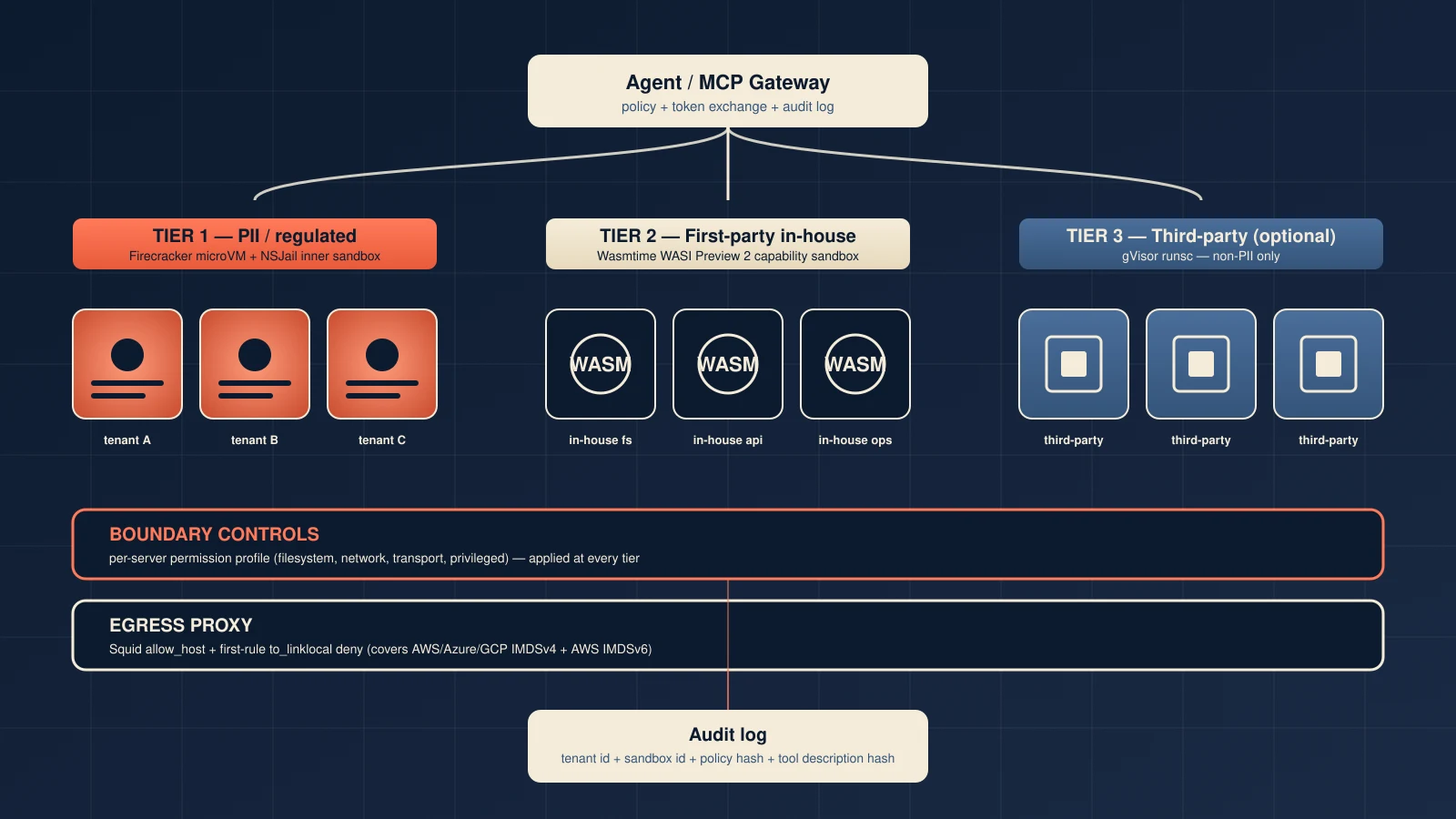
The smallest set of sandbox tiers that survives a SOC 2 / ISO 27001 review for a regulated multi-tenant SaaS is two, plus an optional third:
- Tier 1 — Firecracker microVM with NSJail inner sandbox. Each MCP server runs in its own microVM. Per-call invocations are wrapped in NSJail with a seccomp-bpf filter. Use this tier for any MCP server that touches PII, payment data, authentication material, or anything inside the SOC 2 trust boundary.
- Tier 2 — Wasmtime WASI Preview 2 capability sandbox. First-party MCP servers compiled to a WASI component run with no ambient authority. Every filesystem, network, env, and clock capability is explicitly granted by the host embedding. Use this tier for in-house MCP servers that you can compile to WASI.
- Optional Tier 3 — gVisor
runsc. Third-party MCP servers distributed as Docker / PyPI / npm packages that you cannot compile to WASI today. Weaker than Tier 1, stronger than a vanilla container. Acceptable for non-PII workloads in regulated environments.
The rest of this post is the per-tier checklist and the boundary controls the tier alone does not give you.
Tier 1 — Firecracker microVM with NSJail inner sandbox
Firecracker is a microVM VMM that runs each guest as a hardware-virtualized VM with its own kernel.2 The threat-containment model is nested trust zones: the guest vCPU is least-trusted, the host kernel is most-trusted, and the separation is enforced by KVM plus the jailer.2 Throughput is roughly five microVMs per host-core per second, with a 128 MiB minimum memory per guest.2
The jailer is a short-lived root-privileged process that builds a mount namespace, optionally a network namespace and PID namespace, chroots the Firecracker binary in place, drops uid/gid on exec, and then execs into the jailed Firecracker VMM.2 The jailed Firecracker process is the one that sets PR_SET_NO_NEW_PRIVS=1 and loads the per-thread BPF seccomp filter before any guest code runs.2
For Pattern A buyers (regulated multi-tenant SaaS), the inner layer is NSJail: a per-call process wrapped in a Linux namespace + seccomp-bpf filter, with empty root, only the bind-mounted paths the policy allows, and no NET_ADMIN. A single MCP-server exploit gets a one-shot NSJail container with a default-deny syscall filter; the caller’s MCP server cannot escalate to the host kernel.
Two jailer-era CVEs are worth recording in the buyer evidence package. CVE-2026-1386 (symlink in the jailer init, CVSS 6.0) is patched in v1.13.2 and v1.14.1.3 CVE-2026-5747 (virtio-pci out-of-bounds write, CVSS 8.7) is PCI-only and patched in v1.14.4 and v1.15.1.3 Production must pin to v1.15.1 or later.
One gap the upstream jailer does not close for itself: it does not call capset to bound its own capability set, does not install a seccomp filter on itself, and does not set PR_SET_NO_NEW_PRIVS on its own process.2 The buyer evidence package has to acknowledge this. A small wrapper shim that calls prctl(PR_SET_NO_NEW_PRIVS,1) then bounds the capability set to only what the jailer needs, then loads a minimal defense-in-depth seccomp filter before exec’ing the upstream jailer, closes the gap. The wrapper can verify itself by reading /proc/<pid>/status and asserting NoNewPrivs=1, CapBnd=0x0, and Seccomp=2.
Tier 2 — Wasmtime WASI Preview 2 capability sandbox
Wasmtime is a WebAssembly runtime that, on the WASI Preview 2 ABI, implements a capability-based security model with no ambient authority.4 The default state of a WASI component has no filesystem, no network, no environment variables, and no stdio. Every capability is explicitly granted by the host embedding through WasiCtxBuilder.4
The capability grant shape is what makes Tier 2 mathematically reasoning-able:
preopened_dir(host, guest, dir_perms, file_perms)— scoped filesystem access with read-only or read-write perms.env(k, v)— explicit env var allowlist.allow_tcp(true)/allow_udp(true)— enable TCP/UDP protocol at all (default-deny on address).socket_addr_check(closure)— per-connection network allowlist at the socket layer.inherit_network()— the escape hatch, explicitly dangerous.
For the HTTP layer the canonical hook is WasiHttpHooks::send_request. The hook receives the already-built hyper::Request plus an OutgoingRequestConfig, so it can inspect the literal authority string, compare it against an allowlist stored in the host state, and either reject or delegate to default_send_request.4
The reference production MCP server on Wasmtime is wasmcp. It runs as a middleware chain of WebAssembly components with HTTP and stdio transports layered on top. No production Wasmtime MCP embedding today exposes a public FQDN allowlist at the wasi:http boundary, so a buyer integrating a first-party MCP server on Wasmtime in production must build a custom embedding and override WasiHttpHooks::send_request themselves.
Tier 2 is the right answer for first-party MCP servers because:
- The capability manifest is the policy — there is no separate Docker / Squid / iptables layer to keep in sync.
- Startup is in microseconds; memory is in single-digit megabytes; pool sizing is trivial.
- Audit is straightforward: the embedder logs every capability grant at component instantiation time.
Tier 2 is the wrong answer for third-party MCP servers distributed as Docker / PyPI / npm packages. Those do not ship as WASI components. Rewriting them is a multi-quarter migration.
Optional Tier 3 — gVisor runsc for third-party MCP servers
For third-party MCP servers you cannot compile to WASI, gVisor runsc is the strongest container-runtime sandbox that does not require a microVM per workload. It runs the application in a user-space kernel (“Sentry”) that intercepts syscalls; the host kernel never sees raw syscalls from the sandboxed process.5 Memory overhead is 30–50 MiB per sandbox on top of application memory.5
The cold-start story is more honest than the marketing copy. Blog posts and AI overviews cite 50–100ms. The actual production number, confirmed by a gVisor collaborator in the upstream issue tracker, is closer to 300ms on current code:
“Startup time on the order of 300ms seems like a reasonable approximation of the current state of gVisor startup performance at the moment. I am not sure how the author in the blog post quoted in the OP gets the 50-100ms figure from, I’m not aware of gVisor ever hitting that.”
— EtiennePerot, gVisor collaborator, github.com/google/gvisor#131825
Two optimizations bring the warm-pool number down to roughly 24ms p50 with 1–3ms standard deviation: THP tuning (transparent_hugepage/defrag=defer) and a warm pool of pre-booted sandboxes dispatched via runsc exec.5 Plan for ~50 MiB RSS per warm slot and per-tenant pool partitioning.
There is one gVisor-specific CVE in the last 24 months: CVE-2025-2713 (HostLeak LPE, CVSS 6.8, EPSS 0.072%).5 Beyond that, gVisor structurally defends against ~96% of Linux kernel CVEs because the Sentry reimplements the syscall surface in Go.5
The honest Tier 3 fit: third-party MCP servers that cannot be compiled to WASI today, in deployments where the audit story does not require the hardware-backed boundary of Firecracker. Non-PII workloads in a regulated SaaS, with a per-server permission profile and an egress proxy in front.
Boundary controls you cannot skip
The sandbox alone does not satisfy OWASP MCP §3 and §5. Three boundary controls are mandatory on every tier.
Per-server permission profile
A per-server permission profile is the source of truth for filesystem, network, transport, and privilege. In ToolHive’s permission-profile schema it has five top-level fields:6
read— read-only mount declarations (three formats: bare path,host:container[:ro],volume://name:/path).write— read-write mount declarations.network.outbound—insecure_allow_all,allow_host(FQDN or CIDR list),allow_port(port list).network.inbound—allow_host(CIDR list).privileged— defaults tofalse; setting totrueremoves most isolation.
The profile is enforced via a Squid egress proxy + custom DNS container + HTTP_PROXY/HTTPS_PROXY env injection on the docker runtime.6 On the Wasmtime runtime, the same fields map onto WasiCtxBuilder::preopened_dir, socket_addr_check, and allow_tcp/allow_udp.
Transport must default to stdio for local servers, with host=127.0.0.1 to prevent the DNS-rebinding vector the MCP spec warns about for streamable-HTTP.7
Egress proxy with cloud-metadata deny-list
Every tier needs an egress proxy that explicitly denies cloud-metadata endpoints. The OWASP §5 SSRF defense is incomplete without it.
The canonical primary-docs-grounded control is a Squid proxy with a built-in to_linklocal deny rule. Squid’s default Recommended minimum Access Permission config includes http_access deny to_linklocal, which blocks 169.254.0.0/16 (AWS / Azure / GCP / Oracle / Alibaba IMDSv4) and fd00:ec2::/64 (AWS IMDSv6 on Nitro instances).8 The deny must be the first rule so a per-server allow rule cannot shadow it. The per-server allowlist (e.g. .api.github.com, .slack.com) comes next, then http_access deny all as the default-deny terminator.
Two gotchas the deployment has to respect: Cilium FQDN policies and Cilium Egress Gateway do not substitute for the IP-based deny (Cilium Egress Gateway does not affect local link-local, and FQDN matches DNS names not IMDS IPs), and AWS IMDSv2 token enforcement is a host-level iptables job, not a Squid job.8
OAuth-metadata SSRF defense
OAuth metadata discovery is the second SSRF surface. The MCP spec allows the client to fetch the OAuth protected-resource metadata from the URL the resource server returns in WWW-Authenticate: ... resource_metadata=..., or from the .well-known/oauth-protected-resource path.7 A compromised MCP server can return a metadata URL pointing at the cloud-metadata endpoint. The egress deny-list is the only thing that stops it.
The Anthropic MCP Security Best Practices also forbid token passthrough — an MCP server must not forward the user’s access token to a downstream resource server with the original audience and scope.7 Use RFC 8693 token exchange (act-on-behalf) to issue a downstream-scoped token at the gateway.
The Kubernetes gap you have to close yourself
If you deploy on Kubernetes, the ToolHive operator does not emit NetworkPolicy resources from MCPServer.spec.permissionProfile today. The reconciler manages ConfigMap, Secret, ServiceAccount, Role, RoleBinding, StatefulSet/Deployment only. There is no Owns(&NetworkPolicy{}) registration, no networking/v1 import, and no kubebuilder RBAC marker for networkpolicies.9
The maintainer’s stated reason is issue #1129, which has been open since July 2025 and was gated on #1127 (now Closed): a NetworkPolicy today would break the unauthenticated headless-service path some MCP transports still depend on.9
Two related issues affect the design:
- The
PermissionProfilefield on the K8s MCPServer CRD is dead code in the operator (issue #4538). The Kubernetes container runtime explicitly ignores the parameter with a// TODOcomment. The profile is applied only as a source of truth for the RunConfig stored in a ConfigMap. - The operator README marks the field as
(not implemented)with the entire Permission Profiles documentation section commented out.
Until the upstream gap closes, a regulated Kubernetes deployment must author NetworkPolicy external to the operator. The minimum viable set per MCPServer:
- A default-deny NetworkPolicy in the namespace (
Ingress+Egress, empty selectors). - An ingress-allow rule that lets only the proxy pod reach the MCP server pod on the configured MCP port.
- An egress-allow rule covering DNS (53/tcp + 53/udp), the kubelet API (10250/tcp), and the per-server
AllowHostlist.
Each NetworkPolicy carries a toolhive.stacklok.dev/permission-profile-hash annotation so drift is detectable. A Validating Admission Webhook denies out-of-band edits that would override the operator’s baseline.
The evidence package a compliance team will actually ask for
For a regulated multi-tenant SaaS deployment, the buyer’s compliance team will ask for, at minimum, the following items:
- Sandbox boundary attestation. Sandbox technology per tier, exact version pin, primary-doc source for the hardening claims. For Firecracker, the evidence is the source-of-truth hardening attestation from
docs/jailer.mdplus the buyer-side shim’s/proc/<pid>/statussnapshot showingNoNewPrivs=1,CapBnd=0x0, andSeccomp=2.2 - Per-MCP-server permission profiles. The full
permissionProfileJSON for each registered server, signed at build time, with the build provenance recorded. - Network-egress policy. The Squid ACL file (or eBPF program binary) with hash pinning. The file must include the cloud-metadata deny rule as the first line and the per-server
dstdomainallowlist as the second line. - Tool-schema pinning policy. Hash generation script, pin storage location, mismatch alert wiring. This is the OWASP §2 + §7 hook.
- OWASP MCP Top 10 coverage matrix. Explicit list of which OWASP MCP controls are realized by which layer (sandbox, gateway, egress, audit).
- Reconciliation drift runbook. For Kubernetes deployments, the runbook for NetworkPolicy drift, including SLI / SLO targets (p50 reconcile ≤ 500ms, p99 ≤ 5s, profile-hash-mismatch count = 0 in steady state).
- External pen-test report. At least one pen-test covering prompt injection → tool poisoning, SSRF, confused deputy, sandbox-escape attempts, and cross-server shadowing.
- OTel / SIEM integration. Tool call traces keyed on a tenant identifier, with audit-log events correlated to the same identifier.
Items 1–4 are needed to put MCP servers into production. Items 5–8 are needed to keep them in production.
Closing
Sandboxing MCP servers in a regulated multi-tenant SaaS is a chain of boundaries, not a single choice. The chain is:
- A per-server permission profile that names the filesystem, network, transport, and privilege for each MCP server.
- A sandbox tier chosen by data sensitivity: Firecracker + NSJail for PII / regulated workloads, Wasmtime WASI for first-party in-house servers, gVisor for the third-party gap.
- An egress proxy with a cloud-metadata deny rule as the first ACL.
- An audit log keyed on the tenant identifier and the sandbox identity.
- An evidence package a compliance reviewer can verify.
Agent Setup can implement this for teams that want MCP servers in production without blurring the boundary between PII / regulated and non-PII workloads. The chain is not bureaucracy. It is how you make MCP servers useful without making their authority invisible.
If you are still working on the agent side, see the AI agent security checklist and which AI agent tools to enable first for the upstream steps.
Sources
Footnotes
-
OWASP, “MCP (Model Context Protocol) Security Cheat Sheet,” §3 Sandbox and Isolate MCP Servers, §5 Input and Output Validation. https://cheatsheetseries.owasp.org/cheatsheets/MCP_Security_Cheat_Sheet.html ↩ ↩2
-
Amazon Web Services, “Firecracker — Design Document” (Sandboxing / Jailer process) and “Firecracker — Jailer Documentation.” https://github.com/firecracker-microvm/firecracker/blob/main/docs/design.md https://github.com/firecracker-microvm/firecracker/blob/main/docs/jailer.md ↩ ↩2 ↩3 ↩4 ↩5 ↩6 ↩7
-
Amazon Web Services Firecracker security advisories — GHSA-36j2-f825-qvgc (CVE-2026-1386) GHSA-776c-mpj7-jm3r (CVE-2026-5747). https://github.com/firecracker-microvm/firecracker/security/advisories/GHSA-36j2-f825-qvgc https://github.com/firecracker-microvm/firecracker/security/advisories/GHSA-776c-mpj7-jm3r ↩ ↩2
-
Bytecode Alliance, “Wasmtime — WASI Preview 2 Plugins” “Wasmtime — Security”
WasiCtxBuilderAPI referenceWasiHttpHookstrait reference. https://docs.wasmtime.dev/wasip2-plugins.html https://docs.wasmtime.dev/security.html https://docs.rs/wasmtime-wasi/latest/wasmtime_wasi/struct.WasiCtxBuilder.html https://docs.wasmtime.dev/api/wasmtime_wasi_http/trait.WasiHttpHooks.html ↩ ↩2 ↩3 -
Google, “gVisor — Performance Guide” “gVisor — Compatibility Guide” “gVisor — Security Track Record” EtiennePerot GitHub issue google/gvisor#13182 GitHub Advisory GHSA-4fj4-9m67-3mj3 CVE-2025-2713. https://gvisor.dev/docs/architecture_guide/performance/ https://gvisor.dev/docs/user_guide/compatibility/ https://gvisor.dev/security-track-record https://github.com/google/gvisor/issues/13182 https://github.com/advisories/GHSA-4fj4-9m67-3mj3 ↩ ↩2 ↩3 ↩4 ↩5 ↩6
-
Stacklok, “ToolHive — RunConfig and Permission Profiles.” https://raw.githubusercontent.com/stacklok/toolhive/main/docs/arch/05-runconfig-and-permissions.md ↩ ↩2
-
Anthropic / Model Context Protocol, “Security Best Practices.” https://modelcontextprotocol.io/docs/tutorials/security/security_best_practices ↩ ↩2 ↩3
-
Squid Cache Project “http_access configuration directive v6” “SquidFaq/SquidAcl” Amazon Web Services “Instance metadata and user data — Limit access to the IMDS” Microsoft Azure “Azure Instance Metadata Service” Google Cloud “Compute Engine metadata server overview”. https://wiki.squid-cache.org/SquidFaq/SquidAcl https://github.com/squid-cache/squid/blob/master/src/cf.data.pre https://docs.aws.amazon.com/AWSEC2/latest/UserGuide/instance-metadata-limiting-access.html https://learn.microsoft.com/en-us/azure/virtual-machines/instance-metadata-service https://docs.cloud.google.com/compute/docs/metadata/overview ↩ ↩2
-
Stacklok ToolHive GitHub issue #1129 (NetworkPolicy for Headless Services for MCP Servers) GitHub issue #4538 (Remove unused PermissionProfile from operator CRD)
cmd/thv-operator/controllers/mcpserver_controller.go. https://github.com/stacklok/toolhive/issues/1129 https://github.com/stacklok/toolhive/issues/4538 https://raw.githubusercontent.com/stacklok/toolhive/main/cmd/thv-operator/controllers/mcpserver_controller.go ↩ ↩2